ラベル jQuery の投稿を表示しています。 すべての投稿を表示

2016年12月18日日曜日

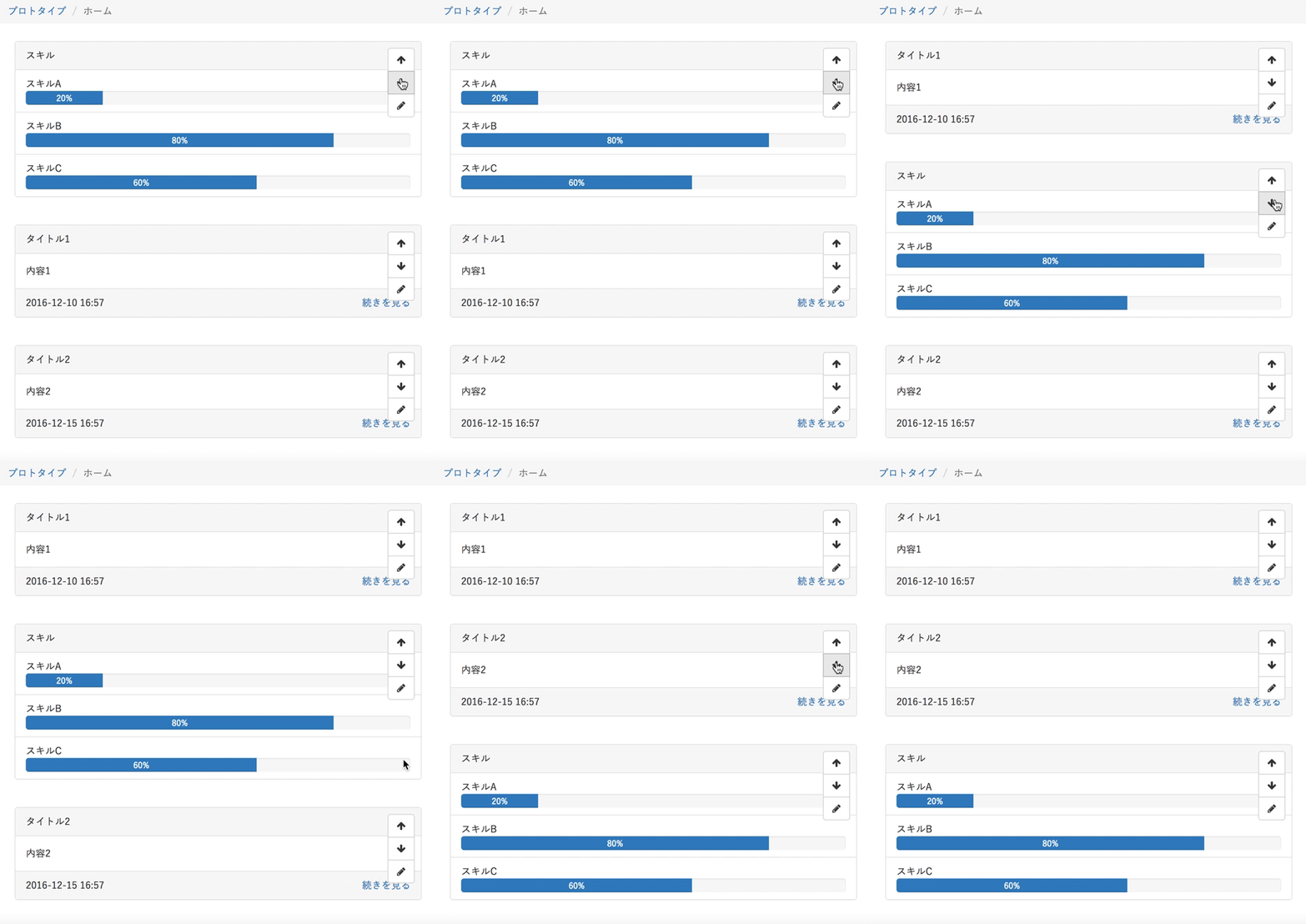
jQueryで前後の要素を入れ替えるシンプルな書き方

動きのイメージ


コード

<section class="main container">
    <section>
        要素1
    </section>
    <section>
        要素2
    </section>
    <section>
        要素3
    </section>
</section> 
<script>
$(function() {
    $('下へのセレクタ').click(function() {
        var section = $('section.main > section').has(this);
        section.next().after(section);
    });
    $('上へのセレクタ').click(function() {
        var section = $('section.main > section').has(this);
        section.prev().before(section);
    });
});
</script>

解説

一つ下へ移動する場合、該当の要素を次の要素`next()`の後`after()`に置く
一つ上へ移動する場合、該当の要素を前の要素`prev()`の後`before()`に置く

要素の個数や順番を計算するなどを最初に考えたがプロトタイプ作る上ではこれで十分だったのでメモ


2014年2月16日日曜日

jQuery チェックの有無でテキスト入力のdisabledを制御する


チェックボックスやラジオボタンでその他にチェックが付いている時のみテキストへの入力を許可する


前提

<input type="radio" value="1" id="PayDescription1" name="data[Pay][Description]" />
<label for="PayDescription1">食費</label>
<input type="radio" value="2" id="PayDescription2"name="data[Pay][Description]" />
<label for="PayDescription2">交通費</label>
<input type="radio" value="3" id="PayOther" name="data[Pay][Description]" />
<label for="PayOther">その他</label>
<input type="text" name="data[Pay][OtherText]" id="PayOtherText" />

$(function(){
    $("#PayOther").change(function(){                                                                                                                  
        if ($("#PayOther").is(':checked')){                                                                                                            
            $("#PayOtherText").prop('disabled', false);                                                                                                
        } else {                                                                                                                                                                                        
            $("#PayOtherText").prop('disabled', true);                                                                                                 
        }                                                                                                                                                                                               
    }).change();                                                                                                                                                                                        
})


<input type="checkbox" value="1" id="PayDescription1" name="data[Pay][Description]" />
<label for="PayDescription1">食費</label>
<input type="checkbox" value="2" id="PayDescription2"name="data[Pay][Description]" />
<label for="PayDescription2">交通費</label>
<input type="checkbox" value="3" id="PayOther" name="data[Pay][Description]" />
<label for="PayOther">その他</label>
<input type="text" name="data[Pay][OtherText]" id="PayOtherText" />

$(function(){
    $("#PayOther").change(function(){                                                                                                                  
        if ($("#PayOther").is(':checked')){                                                                                                            
            $("#PayOtherText").prop('disabled', false);                                                                                                
        } else {                                                                                                                                                                                        
            $("#PayOtherText").prop('disabled', true);                                                                                                 
        }                                                                                                                                                                                               
    }).change();                                                                                                                                                                                        
})